Saturday, January 9, 2016

Installing Unbreakable Enterprise Kernel 4 on Oracle Linux 7

As announced here the Unbreakable Enterprise Kernel 4 is now available for Oracle Linux 6 & 7.
I was actually building a baseline APEX VM based on my personal preferences late last year.
To safe others and me the searching here is a quick writeup of the steps involved.

Start by making UEK4 repository for Oracle Linux 7 known to yum.
Use your favorite editor to edit the file /etc/yum.repos.d/public-yum-ol7.repo.
Then either add below lines to the file or replace the ones for ol7_UEKR3 with them.
Actually you cn copy the repository ol7_UEKR3 and just replace every 3 with a 4.
[ol7_UEKR4]
name=Latest Unbreakable Enterprise Kernel Release 4 for Oracle Linux $releasever ($basearch)
baseurl=http://public-yum.oracle.com/repo/OracleLinux/OL7/UEKR4/$basearch/
gpgkey=file:///etc/pki/rpm-gpg/RPM-GPG-KEY-oracle
gpgcheck=1
enabled=1
Now run yum update and verify that you actually get the version 4.
Depending on your internet connection's bandwidth this is a good time to grab a coffee.
You should at least see below line, otherwise you won't get the new kernel.
kernel-uek                      x86_64             4.1.12-32.el7uek                    ol7_UEKR4               43 M
Review the output from yum and then confirm with y.
Wait until yum has downloaded and installed all pending packages.
After everything has been installed reboot to activated the new kernel.

If you're running the system within VirtualBox like I do remember to reinstall the VirtualBox Guest Additions. You need to do this every time you boot into another kernel because they are compiled against the currently active kernel.
In the VirtualBox VM window go to Devices->Insert Guest Additions CD image.
Then mount the cdrom device if it isn't mounted automatically, then reinstall the additions.
[root@ol7db12c ~]# mount /dev/cdrom /media/cdrom
mount: /dev/sr0 is write-protected, mounting read-only
[root@ol7db12c ~]# /media/cdrom/VBoxLinuxAdditions.run
Verifying archive integrity... All good.
Uncompressing VirtualBox 5.0.12 Guest Additions for Linux............
VirtualBox Guest Additions installer
Removing installed version 5.0.12 of VirtualBox Guest Additions...
Removing existing VirtualBox non-DKMS kernel modules[  OK  ]
Copying additional installer modules ...
Installing additional modules ...
Removing existing VirtualBox non-DKMS kernel modules[  OK  ]
Building the VirtualBox Guest Additions kernel modules
Building the main Guest Additions module[  OK  ]
Building the shared folder support module[  OK  ]
Building the OpenGL support module[  OK  ]
Doing non-kernel setup of the Guest Additions[  OK  ]
Starting the VirtualBox Guest Additions [  OK  ]
Installing the Window System drivers
Could not find the X.Org or XFree86 Window System, skipping.

Have fun with the new kernel!

Friday, January 8, 2016

Coloring Cells in an Interactive Report

This is a quick post on something that came up on slack this week.
The task was basically to highlight certain cells in an interactive report based on the values in another column. While the highlighting feature in the interactive report is great that's one thing you can't do with it. You have the choice of highlighting the whole row or the cell in the column on which you based the condition. Another situation where the builtin highlighting isn't enough is when you need some complex conditions involving more than one column.

Took some iterations, but here's one solution to this.
I'll first outline the building blocks and then explain how they work together including some failed attempts on the way getting to this.
Interactive Report Query:
SELECT empno,
       ename,
       job,
       mgr,
       hiredate,
       sal,
       comm,
       deptno,
       CASE WHEN sal <= 1500 THEN 'data-style="background-color:green"' 
            WHEN sal > 1500 AND sal <= 3000 THEN 'data-style="background-color:orange"'
            WHEN sal > 3000 THEN 'data-style="background-color:red"'
            ELSE NULL
       END css_style
  FROM emp

Then set the css_style column to hidden and set the "HTML Expression" attribute on the column you want colored to something like the following.
Note: I use the SAL column here, but you can really use any column.
HTML Expression of column SAL:
<span #CSS_STYLE#>#SAL#</span>

The last bit is some JavaScript code which you put into a dynamic action firing on event "After Refresh" for the interactive report region. Make sure to also set "Fire On Page Load" to yes, otherwise you have no coloring after page load.
JavaScript Code:
apex.jQuery("span[data-style]").each(
  function()
  { 
    apex.jQuery(this).
      parent().attr( 'style'
                   , apex.jQuery(this).attr('data-style')
                   ); 
  }
);

If you don't want to read the full story you can stop reading here and have a look at the example app to be found at https://apex.oracle.com/pls/apex/f?p=83537.

Still reading?
Let's take a look at how we got to a working solution and how it does it's magic.

In the query we are laying the foundation by adding a column which computes the needed style for us. You might wonder why there is "data-style" instead of simply "style". Let me show you how the report would look if you would just be applying a style to the span element.
Just styling the span element

This doesn't look good and the reason is that the span element is an inline element only using the space it needs and not filling all available space as block elements do. Next try would be setting the span element to behave like a block element by adding display: block to the style definition.
Styling the span element with added display:block
A bit better, but this still isn't coloring the whole cell. To keep it short there where some other tries using some CSS-Wizardry which didn't work out too good either.
Back to the "data-style" thing. You are allowed to add your own custom attributes to HTML elements if you prefix them with "data-". Browsers will ignore them but from JavaScript or in this case jQuery you can access and utilize those attributes.
Let's have a closer look at the JavaScript code and walk through the logic.
  1. Select all span elements which have an attribute called data-style
    apex.jQuery("span[data-style]")
  2. Loop through the jQuery array and call an anonymous function for each item
    .each( function() {
  3. Find the current item's parent element (that's the for the cell)
    apex.jQuery(this).parent()
  4. Set the parent's style attribute using the span's data-style attribute
    .attr('style', apex.jQuery(this).attr('data-style'))
Finally we had something which looks very much like the inbuilt highlighting:


So long folks, this post actually got longer than I expected.

Happy IR-Hacking :-)

Wednesday, October 7, 2015

Using CodeMirror in your APEX Application

I just had a look at a blog post by Connor McDonald where he's asking for opinions how code should be presented on the AskTom website.
In my opinion I would love to have the line numbers removed from the actually code and instead let the get generated by a code highlighter.
With APEX 5 the development team uses CodeMirror for the App Builder, meaning the needed library is already included with every installation of APEX 5.

Getting your code highlighted

First of all I'm assuming you put your code into some sort of a tag, otherwise it wouldn't possible to distinguish code from other text. I did a quick check on the AskTom website and they seem to use the <pre> tag, so I'll use the same to demonstrate. Let's prepare a single page for displaying nice highlighted code.

Update page JavaScript and CSS attributes

Add following to JavaScript File URLs:
#IMAGE_PREFIX#libraries/codemirror/4.4/codemirror-custom.min.js
#IMAGE_PREFIX#libraries/codemirror/4.4/mode/sql/sql.min.js

Add this to the "Execute when Page Loads" sections:
apex.jQuery(".code").each(function() 
{ 
  var myThis = apex.jQuery(this);
  var myCode = myThis.html();
  var myMIME = myThis.attr("data-code-mode");
  myThis.empty();
  CodeMirror(
    this,
    {
      value: myCode,
      mode: myMIME,
      lineNumbers: !myThis.is('.nolinenumbers'),
      readOnly: true
    }  
  );      
});
This code searches all elements having class "code" and uses the contained html as the code to highlight. The language is derived from an attribute called "data-code-mode", if you want to use something else than what is included in the sql.min.js file you need to include additional files from  the CodeMirror mode directory.

In CSS File URLs add the CodeMirror gloabl css file:
#IMAGE_PREFIX#libraries/codemirror/4.4/codemirror-custom.min.css

Finally specify this for Inline CSS:
.CodeMirror {
    height: auto!important;   
}

Adding code blocks

Now just add a new region to the page, I have used static content for now as this is just an example.
The content of the region is the following:
This is some text first...
Now show code:
<pre class="code" data-code-mode="text/x-plsql">DECLARE
  l_data VARCHAR2(32767);
BEGIN
  NULL;
END;</pre>
More text below code block.
now using a div for code:
<div class="code" data-code-mode="text/x-plsql">
SELECT user
  FROM dual;</div>
Nice, isn't it?

Finally some code without line numbers 
<span class="code nolinenumbers" data-code-mode="text/x-plsql">SELECT * FROM emp;</span>
where we just select everything from the famous emp table.

And the rendered result looks like this:

This is all more or less a quick hack, but I hope you get the idea and can make some good use of it.

Tuesday, October 6, 2015

Using Wallet Authentication with SQLcl

Ever since SQLcl came out I was waiting for it to support wallet authentication.
Today the waiting is over and all you need to do is grab the new SQLcl release from the SQL Developer download page. (Hint: The download link is at the bottom of the page.)
Now that you have the latest release let's prepare your client machine to use credentials stored in a wallet.

Preparing the for wallet authentication

First of all you need an Oracle client installed as wallet authentication is not possible using the thin driver. Make sure to have your client home on 12.1.0.2.x otherwise SQLcl can't make use of it.

Then update your sqlnet.ora file by adding following lines:
WALLET_LOCATION =
   (SOURCE =
     (METHOD = FILE)
     (METHOD_DATA =
       (DIRECTORY = D:\ora_wallet)
     )
   )

SQLNET.WALLET_OVERRIDE = TRUE
Make sure to update the line where the directory is set to match the location where you want to store your wallet. The last line allows the wallet to override any existing OS authentication setting.

Now modify your tnsnames.ora and add another entry which points to the database you want to connect to later. Give it a recognizable name because you will need it again when saving the credentials in the wallet. I will use "wallet_test" as the tnsname in this post.
If you use different users on a single database you have to add one tns entry for each user. The reason is that there is a one to one relationship between a credential and a tns entry.

Next step is to create the directory where your wallet should be stored.
Afterwards create the wallet by using the orapki utility from the Oracle Client:
orapki wallet create -wallet "D:\ora_wallet" -pwd "test_1234" -auto_login_local
Now store the credentials in the wallet by using the mkstore tool with following syntax:
mkstore -wrl "D:\ora_wallet" -createCredential tnsname username password
You can also emit the password and then you'll be asked for it by the tool.
Enter the wallet password and wait for mkstore to exit.

Finally test your setup by using good old SQL*Plus:
sqlplus /@wallet_test

Using the wallet with SQLcl

SQLcl is a Java application and therefore uses jdbc to connect to the database.
The latest release added support for custom jdbc connect strings and that is what we actually need.
Connecting with SQLcl using the above created credential looks like this:
sql /@jdbc:oracle:oci8:@wallet_test
The syntax might look a bit strange compared to the SQL*Plus one but you need to put the "/@" before the custom jdbc connection string and still prefix the tnsname with an "@".

Enjoy connecting to your database without specifying a password on the command line.
The main use case will most probably be for batch scripts, but I think switching to wallet authentication as much as possible also helps when you have to work in public places.

Thanks to the SQLcl team for adding another great feature.

P.S.: @Kris, the next blog post is on you. ;-)

Tuesday, September 1, 2015

IR Column Headings with HTML in APEX 5

Old and new world

This might be something for all of you that have used HTML in interactive report column headings .
It was a convenient way to break up long headings if you already knew the content was much smaller.
To give you an example think of a date field with format mask 'DD.MM.YYYY' and a column heading of 'Final Auditor Approval Date'.
Now compare the size of the content to the heading size, which is 10 characters to 27 characters, so you might be wasting a lot of real estate for this column.
One approach is to specify the column width and enable word wrap using css, but what if you wanted the column heading to wrap at a specific position?
Well you can play around with your css rule until you get the desired result or you simply embed an html line break into your column heading and I typically used the latter.
The minute you upgrade to APEX 5 there's a small caveat with this solution.
Let me show you an example of what I'm talking about:

Do you see the html characters in the column list when you click on the magnifying glass?
In APEX versions before 5 the tag was replaced by a blank, nowadays it's escaped.
APEX 5 has gotten way better responsive features than before, but what if even that isn't sufficient?

There's an app plugin for that

Having the immediate need to find a solution I decided to create a plugin to solve this issue.
While thinking of options one that quickly came up was using the "Single Row View Label" as I'm not using the "Single Row View" in any of my applications.
Below you see an example I used during testing:
I removed the line break from the "Heading" and then changed the "Single Row View Label" to include it. So the data is stored in the APEX Metadata and I should now be able to use it.

The plugin itself is a dynamic action plugin and puts a small JavaScript function into the page.
The function retrieves a JSON object with column ids and column headings and then iterates over the object replacing the heading. Below you find sample code for the function:
function de_itt_apexir_hdr_break()
{ apex.server.plugin
  (
    '#AJAX_IDENT#' // This gets replaced by apex_plugin.get_ajax_identifier
  , { x01: this.affectedElements[0].id } // IR id
  , { success: function( pData ) 
               { apex.jQuery.each
                 ( pData, function(index, value)
                   { apex.jQuery("#" + index + " > a").html(value); }
                 ); 
               }
    }
  );
};

The callback function runs following query to compose the JSON object:
SELECT 'C' || aapic.column_id column_id
     , aapic.form_label
  FROM apex_application_page_ir_col aapic
     , apex_application_page_regions aapr
 WHERE aapic.region_id = aapr.region_id
   AND aapr.application_id = apex_application.g_flow_id
   AND ( aapr.region_id = to_number( regexp_substr( apex_application.g_x01, '\d+') )
      OR aapr.static_id = apex_application.g_x01
       )
   AND aapic.report_label != aapic.form_label
;

So far my tests didn't show any negative impact except for the obvious extra round trip to the database. Below screenshot shows same IR as before but using the plugin.


Want to test the plugin?  Download it here and install like any other plugin.
Follow the included readme file to create a dynamic action based on the plugin.
I haven't run that many tests yet, but maybe you would like to help?
If you encounter any issues or have recommendations, either open an issue in the repository or write a comment here.

Hopefully the plugin helps you to overcome one of the small hick-ups when upgrading to APEX 5.

Thursday, August 13, 2015

Using conditional compilation for APEX dependent code

I'm currently working on a new release of my PPTX Creator Package.
While adding parts which would only compile if APEX is installed in the database I thought maybe it's a bad idea to introduce a hard dependency as a lot of the code doesn't need APEX installed.
So I needed to come up with a way to allow installation without APEX, but also enable additional functions when APEX is installed.
The options I checked where:
  1. Split into APEX-specific and generic package
  2. Offer two versions of the package
  3. Use conditional compilation
From the titel you might already know which option I chose, but let's briefly look at the implications of the options.

Option 1:
Splitting into two packages seemed like an immediate win as it feels natural for the use case. However when looking a bit further it could lead to the need of exposing internal parts of the generic package.
Running on 12c you could use the ACCESSIBLE BY clause to mitigate, but not everyone is on 12c (yet). A good blog post on the ACCESSIBLE BY clause can be found here.

Option 2:
I immediately moved over that option, just imagine the maintenance effort:
It would be a like fixing two different packages with a lot of copy-and-paste code back and forth.
No I don't want that!

Option 3:
I decided to use conditional compilation for the APEX specific features. For those of you who don't know conditional compilation yet, have a look at this Oracle Magazine Article by Steven Feuerstein from 2006 and also check out the links in that article.
In short conditional compilation allows you to exclude or include parts of the package during compilation based on conditions specified. A typical use case for conditional compilation is having one package which conditionally compiles with different code based on the Oracle Release.

So I had decided to use conditional compilation, but then I realized that I hadn't thought of how to determine if APEX is installed. Unlike the version use case, for which the database provides the DBMS_DB_VERSION package, there is no such thing for verifying installed components.
So let's start with how to generally check if APEX is installed.
If you have DBA rights you can use following query:
SELECT comp_name, version, status
  FROM dba_registry
 WHERE comp_name = 'Oracle Application Express'
;

Without DBA rights it's a bit different, as there is no ALL_REGISTRY table in the dictionary. There is a USER_REGISTRY table but that doesn't help either.
However there is something called ALL_REGISTRY_BANNERS and we can use that one with any user. To check if APEX is installed simply run the following query:
SELECT banner
  FROM all_registry_banners
 WHERE banner LIKE 'Oracle Application Express%'
;

Now let's move on to finding a means to use the query result for controlling the conditional compilation. You can also use user-defined flags for controlling the compilation process, below show how to set a flag called apex_installed for your session.
ALTER SESSION SET plsql_ccflags = 'apex_installed:1';
You can reference this flag in conditional compilation blocks within your code.
To recap, we now have a means to check whether APEX is installed and we are able to set a flag to be used by the conditional compilation.
Putting everything together I ended up with an install script similar to the code code.
SET define '^'
define HASAPX = '0'
column apx new_val HASAPX

SELECT '1' AS apx
  FROM all_registry_banners
 WHERE banner LIKE 'Oracle Application Express'
   AND ROWNUM = 1
;

ALTER SESSION SET plsql_ccflags = 'apex_installed:^HASAPX';
@@install_package.sql

Within the package you surround the code blocks with something like
$IF $$apex_installed = 1 $THEN
-- Put APEX specific code here
$END
To catch the case when the flag isn't set before compilation include an error clause like below
  $IF $$apex_installed IS NULL $THEN
    $ERROR 'Set CCFLAG apex_installed to either 0 or 1.' $END
  $END

That's all for now folks, but stay tuned for the next release of my PPTX Creator package with much enhanced functionality.

Monday, February 23, 2015

APEX IR XLSX Downloader V1.3.0

After a long time I have finally published Release 1.3 of my APEX IR XLSX Downloader.
And because I kept you waiting so long there's one goody included.

Added Features

  • The Interactive Report region ID is now automatically derived if not specified or set NULL.
  • Function get_version which emits the package release you are running.

Bugs Fixed

  • Column header wasn't filled if user didn't give a custom name for a function column in "Group By" view.
    Now the package puts similar names to what the APEX engine generates.

New Demo Application

There is also a new demo application available for download.
You can download it here and install into your own APEX workspace.

As always the source code can be found in the GitHub Repository.
ZIP files for all my GitHub projects can now be found on my GitHub Page.

Enjoy ;-)

Saturday, January 31, 2015

Oracle Application Express EA3 is now available

APEX EA3 is here

Just read this one on Twitter:
So head over to apexea.oracle.com, request your workspace and start testing all the new features.

I received my access within minutes, so be prepared to immediately have a reason for spending time on your computer. ;-)
First thing I did was checking out the "Universal Theme Sample Application".
Shakeeb did a very good job of explaining the Universal Theme Components.

Interestingly the beta documentation for APEX 5.0 was already made available.
A very nice move in my opinion. Click on the link above or use http://docs.oracle.com/cd/E59726_01/index.htm.

So long for now folks and enjoy your first weekend with APEX 5.0 EA3. ;-)

Friday, January 30, 2015

APEX jQuery Modal Dialog Oddities

Lately I have been working on creating a new version of my demo application for the APEX IR XLSX Downloader.
The package provides a set of configuration parameters which I thought would be nice to present to the user instead of being solely defined by the developer.
During that I encountered some oddities when using a jQuery Modal Dialog to render a region as a modal dialog.

Note: I'll show you the steps to reproduce and fix in a newly created application. But you can also just create a new page in an existing application.

Steps to reproduce and fix:
  1. Navigate to the page where you want to put the modal region containing form elements.
  2. Create a new region accepting all defaults
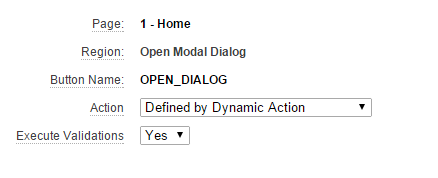
  3. Create a button in that region and set Action to "Defined by Dynamic Action"
  4. Create a new region accepting defaults except for "Display Attributes"
    Select "jQuery Modal Region Template" as "Region Template"
  5. Create at least one item which should save session state on the modal region.
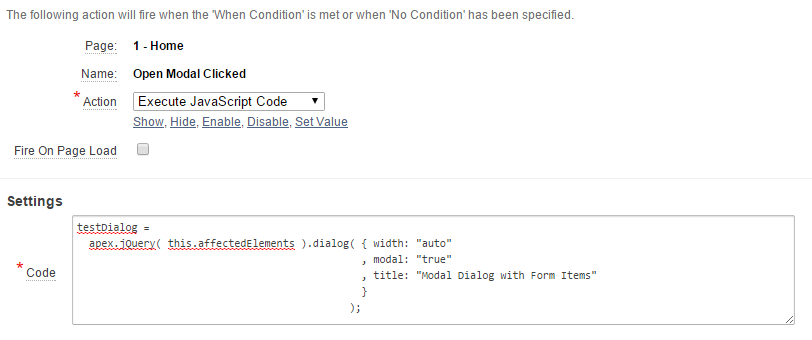
    I used a text item and made it submit on enter for this example.
  6. Create the dynamic action reacting to button click.


  7. Run a simple test
    1. Run the page
    2. Click open Dialog button
    3. Enter something in the text field and hit enter.
    4. Now verify session state
    5. So we submitted the page with a new value in the item, but it doesn't look like it was pushed into session state.
  8. Finding the reason for session state not being updated.
    1. Analyze DOM before dialog open.
    2. Analyze DOM after dialog open.
  9. This tells us that the region gets moved outside of the <form> container, making the item invisible to APEX.
    Therefore no update in session state.
  10. Steps to fix DOM
    1. Create Dynamic Action which fires "Before Page Submit"
    2. Set action to "Execute Javascript Code":
      apex.jQuery( this.affectedElements ).dialog( "destroy" ).appendTo( 'form#wwvFlowForm' );
      
    3. Set "Affected Elements" identical to previous Dynamic Action.
  11. Test again with same steps as noted in 7.
    This should now work.


  12. Enjoy nicely working modal dialogs.

Tuesday, December 9, 2014

APEX IR XLSX Downloader V1.2.3

I have just published Release 1.2.3 of my APEX IR XLX Downloader.

André Meier had a look at my package after DOAG 2014 and pointed out some hick-ups he encountered while using it.
He also made a big effort to bring some proper code formatting and explicit conversions into the XLSX_BUILDER_PKG which is one of the libraries used.

A huge thank you to André, as many of the changes are based on his contribution.

Changes

  • XLSX_BUILDER_PKG
    • Explicit Conversions
    • Code Formatting
    • Better CLOB building using VARCHAR2 buffer (as shown in a previous post)
  • APEXIR_XLSX_PKG
    • If splitting report_columns string would produce a NULL index this is now taken care of and a warning is send to the APEX debug messages.

As always the source code can be found in the GitHub Repository.
ZIP files for all my GitHub projects can now be found on my GitHub Page.

The new demo application is currently under development and will be published soon.
I'm currently creating some sort of packaged application which will better showcase all the different options available.

Stay tuned for more to come.

Tuesday, November 25, 2014

APEX_IR.GET_REPORT Limitations & Wishlist

Luckily nowadays we as APEX developers have access to APEX_IR.GET_REPORT which gives us back the current query of an interactive report.
With that we can actually build really nice plugins enhancing the functionality.
However one thing you have to be aware of is that it will always give you the query of the "Report" view, so if you want to get the query behind the "Group By" view it's back to rebuilding the query manually.
Talking to Patrick Wolf during DOAG 2014 he asked me to write a blog post about it and showcase the behavior.
Therefore I have created a small demo on apexea.oracle.com using an interactive report and a dynamic action to see if the same behavior is also still in APEX 5.
The dynamic action gets the IR query using APEX_IR.GET_REPORT and also sets a read-only field to SYSDATE in order to show it actually fires on event "After Refresh".
You can check out the current behavior here.

So here's my wishlist for the APEX development team:

  • Please give us the query also for the other view-types available for an interactive report.
  • And if you want to supercharge the function give us an additional parameter for choosing whether we want the query for the currently displayed view-type or a specific one.
I imagine a possible function declaration like below:

FUNCTION get_report( p_page_id      IN NUMBER
                   , p_region_id    IN NUMBER
                   , p_report_id    IN NUMBER DEFAULT NULL
                   , p_view_mode_in IN VARCHAR2 DEFAULT NULL
                   )
  RETURN t_report;

So if you do not specify the fourth parameter you get the query for currently displayed view mode, similar to the third already available parameter.

Concatenating VARCHAR2 values into a CLOB

After an inspiring DOAG 2014 I was thinking about some performance improvements for my APEX IR XLSX Downloader.
The actual size of all the single files that need to be build isn't known beforehand but you have to plan for more than the maximum size of a VARCHAR2 variable so you need a CLOB.
However building a CLOB can be really slow if you treat it like a VARCHAR2 and just concat values together.
In addition if you are doing that multiple times you're actually asking for some performance trouble.

I remembered reading a blog post by Carsten Czarski a while ago and got the inspiration from there.
He also reviewed my initial code and helped me make it better.

Maybe you have similar tasks at hand and can benefit from the code.
How it works and how to use is enclosed in the code comments.

Update: Thanks to the comment by SSentinel below I could clean up the code.

/**
* Procedure concatenates a VARCHAR2 to a CLOB.
* It uses another VARCHAR2 as a buffer until it reaches 32767 characters.
* Then it flushes the current buffer to the CLOB and resets the buffer using
* the actual VARCHAR2 to add.
* Your final call needs to be done setting p_eof to TRUE in order to
* flush everything to the CLOB.
*
* @param p_clob        The CLOB buffer.
* @param p_vc_buffer   The intermediate VARCHAR2 buffer. (must be VARCHAR2(32767))
* @param p_vc_addition The VARCHAR2 value you want to append.
* @param p_eof         Indicates if complete buffer should be flushed to CLOB.
*/
PROCEDURE clob_vc_concat( p_clob IN OUT NOCOPY CLOB
                        , p_vc_buffer IN OUT NOCOPY VARCHAR2
                        , p_vc_addition IN VARCHAR2
                        , p_eof IN BOOLEAN DEFAULT FALSE
                        )
AS
BEGIN
  
  -- Standard Flow
  IF NVL(LENGTHB(p_vc_buffer), 0) + NVL(LENGTHB(p_vc_addition), 0) < 32767 THEN
    p_vc_buffer := p_vc_buffer || p_vc_addition;
  ELSE
    IF p_clob IS NULL THEN
      dbms_lob.createtemporary(p_clob, TRUE);
    END IF;
    dbms_lob.writeappend(p_clob, length(p_vc_buffer), p_vc_buffer);
    p_vc_buffer := p_vc_addition;
  END IF;
  
  -- Full Flush requested
  IF p_eof THEN
    IF p_clob IS NULL THEN
       p_clob := p_vc_buffer;
    ELSE
      dbms_lob.writeappend(p_clob, length(p_vc_buffer), p_vc_buffer);
    END IF;
    p_vc_buffer := NULL;
  END IF;

END clob_vc_concat;

Wednesday, November 19, 2014

APEX IR XLSX Downloader V1.2.2

I have just published release 1.2.2 of my APEX IR XLX Downloader.
While attending the DOAG 2014 Conference Dietmar Aust was trying out my package and guess what...
He ran into a bug, so thanks Dietmar for reporting this.

Bugfix

  • Columns without help text break the download.
As always the source code can be found on GitHub.
ZIP files for all my GitHub projects can now be found on my GitHub Page.
For a small demo visit my Demo Application on apex.oracle.com.

Wednesday, November 12, 2014

APEX IR XLSX Downloader V1.2.1

Well, just three days ago I published release 1.2.0.
In the meantime I've been working on updating the README to give you all a better start.

This time there are no bugfixes included as it's only documentation.

Documentation Changes

  • Added list of features
  • Added current limitations
  • Updated "How to Use" section
As always the source code can be found on GitHub.
ZIP files for all my GitHub projects can now be found on my GitHub Page.
For a small demo visit my Demo Application on apex.oracle.com.

Sunday, November 9, 2014

APEX IR XLSX Downloader V1.2.0

I have just published a new minor release of my APEX IR XLSX Downloader.
This time I have fixed a bug regarding control breaks and added one enhancement to column headers.

Enhancement

  • Help text as defined on IR column is now added as a comment to the column header in the spreadsheet.

Bugfix

  • Control breaks with just number or date column are now working.
As always the source code can be found on GitHub.
ZIP file is available in my demo application.

Saturday, September 13, 2014

APEX IR XLSX Downloader V1.1.3

I have just published a new bugfix release of my APEX IR XLSX Downloader.
This time I had to fix some bugs regarding aggregations.

Bugfixes

  • Aggregation values are now always taken from the correct SQL columns.
  • Columns without aggregations defined no longer break the formatting on rows with aggregation values.
As always the source code can be found on GitHub.
ZIP file is available in my demo application.

Friday, September 5, 2014

APEX IR XLSX Downloader V1.1.2

Just a week ago I published a release which supports getting the  GROUP BY report from an IR.
Like most new functionality this one isn't bug free either.
Therefore I have just published release 1.1.2 of my APEX IR XLSX Downloader.

Bugfixes:

  • Package didn't recognize the special aggregate functions like COUNT_DISTINCT, RATIO_TO_REPORT_SUM and RATIO_TO_REPORT_COUNT.

Added Functionality:

  • Internal function to convert column display order into column identifier.
    This will support lifting the column restrictions on GROUP BY reports in the future.
Source code can be found on GitHub.
Download available in my demo application.

Enjoy. ;-)

Friday, August 29, 2014

APEX IR XLSX Downloader - New Release available

Release 1.1.1 of my APEX IR XLSX Downloader has just been published.

Bug Fixes:

  • Highlights now also support the operators "in" and "not in".
  • Highlights with no user defined name now properly display the highlight condition.
  • Still existing filters on removed columns no longer result in an exception, they are simply ignored now.
  • Columns used in link targets are now excluded if not visible on their own.

Added Functionality

  • Added a wrapper procedure handling the whole download task.
    Parameter list is the same as the function returning the results.
  • Initial support to receive the GROUP_BY report if defined.

Known Limitations

  • Standard and GROUP_BY report cannot be exported together into a single file.
  • Columns used in GROUP_BY also need to be present in the standard report, otherwise the columns are not included in the query generated by currently available APEX API.
You can look a the source code on GitHub.
ZIP Archive of package including dependencies can be downloaded from Demo Application.

Wednesday, August 27, 2014

APEX Dictionary - Who uses a column in filters?

I just had the requirement to find out if some users have filters defined on a certain column of an interactive report.
First try was looking at the saved reports view in the application builder, but that didn't help.
And again the APEX Dictionary Views to the rescue.
Following query can be used to check if a column is used in a column filter or highlight.

SELECT r.created_by
     , condition_type
     , cond.condition_name
     , condition_column_name
     , cond.condition_operator
     , cond.condition_expression
     , cond.condition_expression2
     , cond.condition_display
  FROM apex_application_page_ir_cond cond JOIN
       apex_application_page_ir_rpt r
         ON r.application_id = cond.application_id
        AND r.page_id = cond.page_id
        AND r.report_id = cond.report_id
 WHERE cond.application_id = :application_id
   AND cond.page_id = :page_id
   AND cond.condition_column_name = :column_name
;

Note: It will not find column usage in a row filter.

May the APEX Dictionary be with you!

Tuesday, August 12, 2014

APEX Dictionary - Comparing two Interactive Reports

Recently I again had the requirement to compare two Interactive Reports from different applications.
Using the power of the APEX Dictionary this can be done quite easily.

WITH prod AS
(
SELECT column_alias, application_id, report_label, help_text
  FROM apex_application_page_ir_col
 WHERE page_id = :page_id_prod
   AND application_id = :app_id_prod
), dev AS
(
SELECT column_alias, application_id, report_label, help_text
  FROM apex_application_page_ir_col
 WHERE page_id = :page_id_dev
   AND application_id = :app_id_dev
)
SELECT NVL(prod.column_alias, dev.column_alias) column_alias,
       prod.report_label prod_label,
       dev.report_label dev_label,
       CASE WHEN prod.column_alias IS NULL THEN 'Only DEV'
            WHEN dev.column_alias IS NULL THEN 'Only PROD'
            WHEN prod.report_label != dev.report_label 'Differs'
            ELSE NULL
       END status
  FROM prod FULL OUTER JOIN dev ON (prod.column_alias = dev.column_alias)
ORDER BY NVL(prod.column_alias, dev.column_alias)
;
I used "prod" and "dev" as identifiers for the different settings.
This time I was mainly looking for the report labels, but you can easily extend the query to include additional fields from the APEX_APPLICATION_PAGE_IR_COL view.

This has been in my stash for a while but I didn't publish it before.
Oliver Lemm just started a series of APEX Metadata related posts and made me think let's share this snippet.

May the APEX Dictionary be with you!